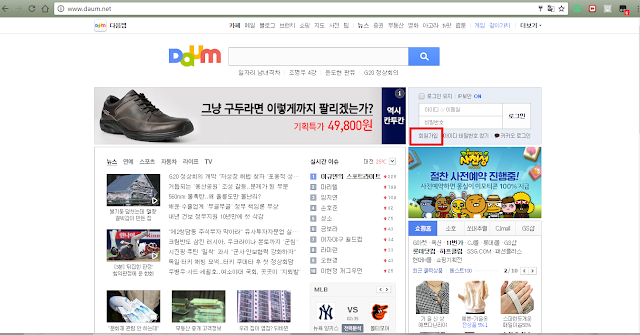
1. Go to www.daum.net
2. Click "회원가입"
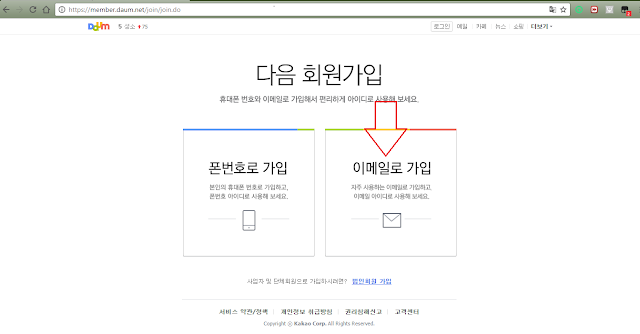
3. Click 2nd option to sign up using email.
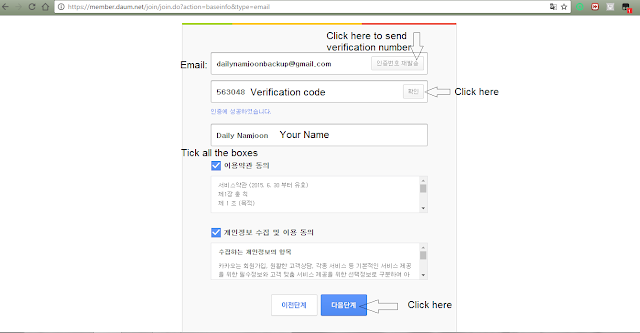
4. Type your email and click the button beside it to send Verification code. Check your email spam folder and copy the 6 digits and paste it on the second empty box and click the button besides it. (Verification code is valid for 10 minutes only). Type your name (only First and Last Name). Tick all the boxes and click the blue button in the bottom.
5. It will give you your daum ID (according to your name) or you can change it to an ID that you want. Type your password.
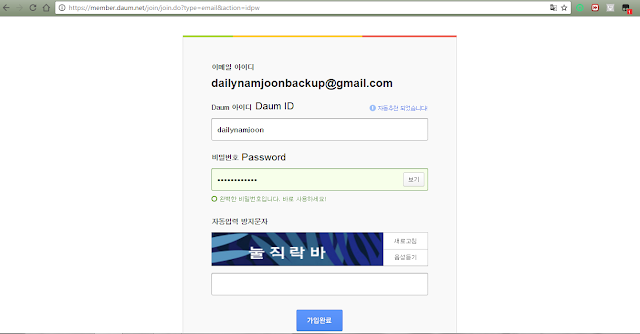
6. Go to http://vkboard.com/virtual-korean-keyboard/ to type Korean language that is written in the box. If you don't know how to type, screenshot the security code and mention Daily Namjoon on twitter. I'll type it for you and just copy & paste it in the box.
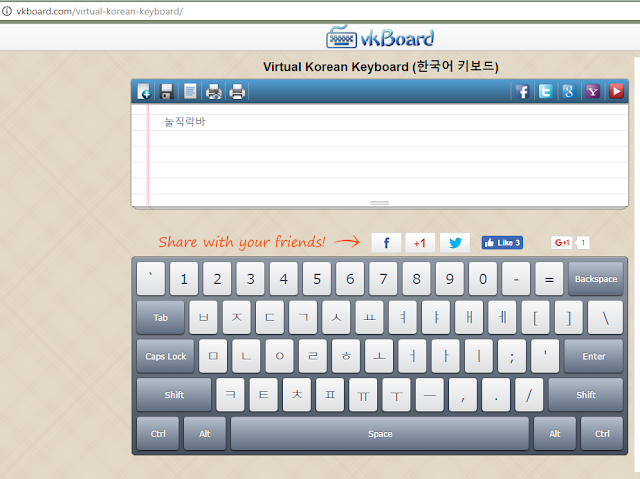
7. After typing/copying the Korean verification words, click "가입완료"
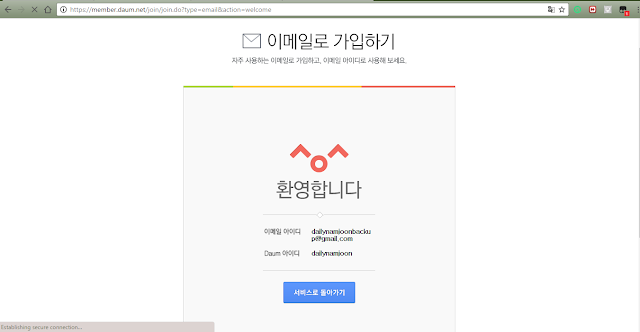
8. Then your "Email ID and your Daum ID" will appear on the screen. Click the blue button again.
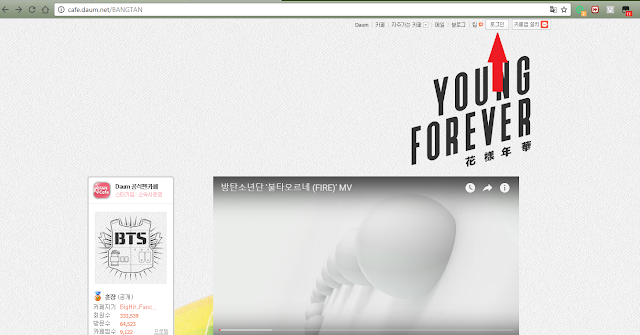
9. To join BTS fancafe, go to http://cafe.daum.net/BANGTAN and click 로그인 which is on top of the screen.
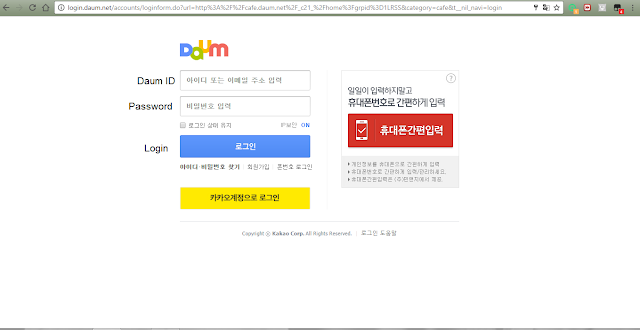
10. Login using your "DAUM ID" and your "DAUM PASSWORD".
11. Click "내 정보" which is on the left side of the screen under BTS logo.
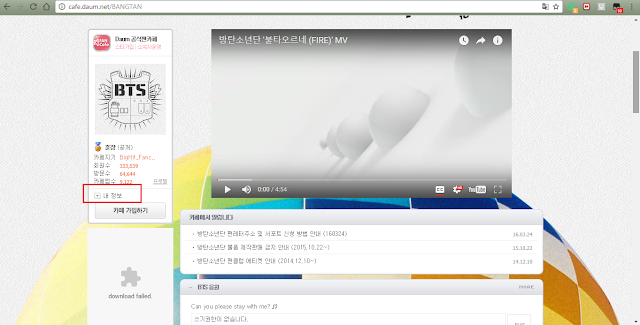
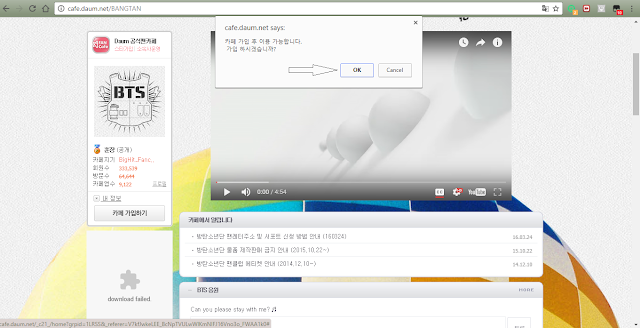
12. Pop-up will appear on the screen which tells you if you want to join BTS Fancafe or not and click "OK"
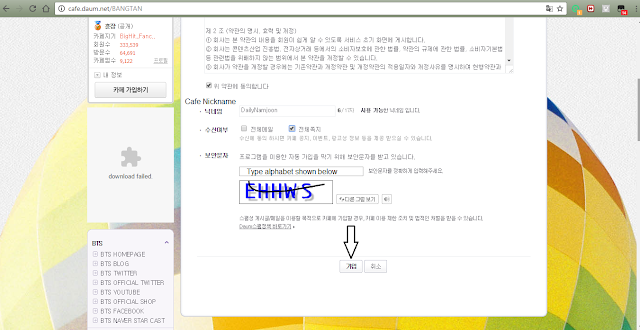
13. Before you type your Cafe nickname, read BTS Fancafe Nickname rules here and read the English translation here
After you fill up your nickname and the alphabet shown in the box, click "가입"
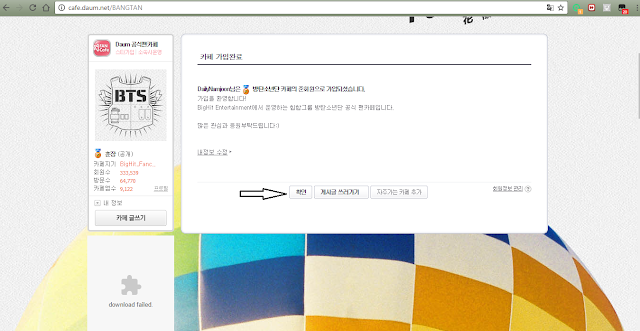
14. Click "확인" and you'll be a member of BTS fancafe.
NOTE: To see BTS posts or write on fancafe, you need to Level up. There are two methods of level up, one is by answering questions and the other is by buying "BTS Official ARMY Recruitment". If you want to level up by answering a question, go to the board "등업신청_월화수" to see the questions on "Monday, Tuesday and Wednesday" and "등업신청_목금토 " to see questions on "Thursday, Friday and Saturday". No level up questions on Sunday. Mon,Tue,Wed questions and Thu,Fri,Sat questions are different. They changed questions every week. I cannot translate the questions for you or tell you the answers because it's violating BTS Fancafe rules. You need to answer the question on your own.
I hope it's useful to everyone who don't know how to join BTS' Fancafe.
-Daily Namjoon
2. Click "회원가입"

3. Click 2nd option to sign up using email.

4. Type your email and click the button beside it to send Verification code. Check your email spam folder and copy the 6 digits and paste it on the second empty box and click the button besides it. (Verification code is valid for 10 minutes only). Type your name (only First and Last Name). Tick all the boxes and click the blue button in the bottom.

5. It will give you your daum ID (according to your name) or you can change it to an ID that you want. Type your password.

6. Go to http://vkboard.com/virtual-korean-keyboard/ to type Korean language that is written in the box. If you don't know how to type, screenshot the security code and mention Daily Namjoon on twitter. I'll type it for you and just copy & paste it in the box.

7. After typing/copying the Korean verification words, click "가입완료"
8. Then your "Email ID and your Daum ID" will appear on the screen. Click the blue button again.

9. To join BTS fancafe, go to http://cafe.daum.net/BANGTAN and click 로그인 which is on top of the screen.

10. Login using your "DAUM ID" and your "DAUM PASSWORD".

11. Click "내 정보" which is on the left side of the screen under BTS logo.

12. Pop-up will appear on the screen which tells you if you want to join BTS Fancafe or not and click "OK"

13. Before you type your Cafe nickname, read BTS Fancafe Nickname rules here and read the English translation here
After you fill up your nickname and the alphabet shown in the box, click "가입"

14. Click "확인" and you'll be a member of BTS fancafe.

NOTE: To see BTS posts or write on fancafe, you need to Level up. There are two methods of level up, one is by answering questions and the other is by buying "BTS Official ARMY Recruitment". If you want to level up by answering a question, go to the board "등업신청_월화수" to see the questions on "Monday, Tuesday and Wednesday" and "등업신청_목금토 " to see questions on "Thursday, Friday and Saturday". No level up questions on Sunday. Mon,Tue,Wed questions and Thu,Fri,Sat questions are different. They changed questions every week. I cannot translate the questions for you or tell you the answers because it's violating BTS Fancafe rules. You need to answer the question on your own.
I hope it's useful to everyone who don't know how to join BTS' Fancafe.
-Daily Namjoon


